
The City of Dublin ETB is co-
funded by the
Government of
Ireland and the European Union.


FET College Íde Finglas student network and email account
As a student of FET College Íde Finglas you will be issued with a student network account which will include a username and password. This will be issued to you by text
For example
username will be Year of College Admission and your Name @colaisteide.ie e.g. 26JaneMurphy@colaisteide.ie
password will be text, numbers and symbols
This account also affords you a printing allowance in FET College Íde Finglas.
Your login details are unique to you and should not be shared with anyone else
Through your FET College Íde Finglas student network and email account you have access to all of the applications contained in Office 365. These include Outlook, Word, Excel, PowerPoint, Calendar, Forms and as well as the virtual learning environments (VLEs) used in FET College Íde Finglas including Microsoft Teams and Moodle.
All of these apps have options to work with them within your internet browser. However, it is recommended that you install them to your computer to get the full functionality of the applications. As students of FET College Íde Finglas, you can install Office 365 on up to five devices. It is recommended that you work on your assignments on either a laptop or desktop computer and not on a mobile phone. If you do not have your own computer, you can apply for the loan of a laptop while you are studying at FET College Íde Finglas. Please contact the office in FET College Íde Finglas to discuss your eligibility for a laptop loan. You can also use the student computer rooms on campus.

FET College Íde Finglas Email Account
Microsoft Outlook will be used to receive and send emails. Your college email will be one of the most important means of communication outside of your classes. You are expected to use email in a professional manner and refrain from any comments which could be regarded as disrespectful or offensive. Once you are fully registered on the course, FET College Íde Finglas, including your teaching team, will ONLY use your college email, so it is important that you check your messages at least once a day.
Getting Started with your FET College Íde Finglas email account
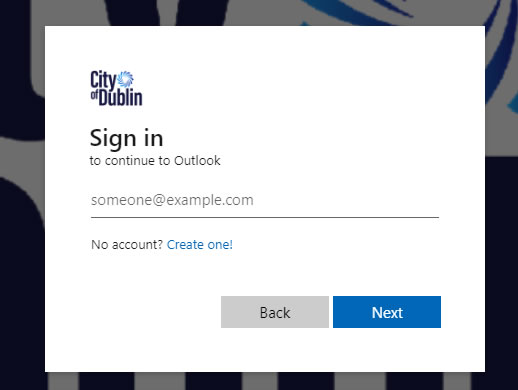
Sign in to your email account here
And follow the instructions to Sign in, using your username and password.
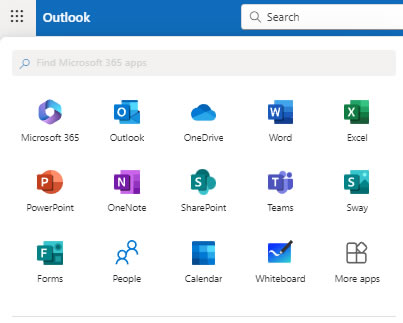
After accessing your email you can Click the App Launcher icon (located in the upper left corner) to choose the tool you want to use (Outlook, OneDrive, Word, Teams, etc.)
Instructions are also available from Microsoft - Getting Started in Outlook Web App
Email Guidelines
Emails can be easily misunderstood and, therefore, it is important to ensure that the message conveys the intended tone (i.e. professional, friendly, courteous). Think of your correspondence over email as practice for your work in a face-to-face environment after college.
- Always use yourname@colaisteide.ie account for college business.
- Insert a relevant subject line, including your course code and/or the module name, (e.g. ‘Jane Murphy - Accounting Technician Course - request for meeting’).
- In the body of the email, state who you are (e.g. Jane Murphy Accounting Technician Individual Project; explain the purpose of your email, make a polite request, thank the receiver and sign off properly (e.g. Kind regards, Best wishes)
- Adopt a friendly and personable tone. Do not write anything that you would not be happy for everyone to see or that you would not say to the recipient’s face.
- Proof-read your email before you send it.
- Do not use text abbreviations such as ‘b4’, ‘gr8’ etc. in an email and avoid slang.
- Do not expect an instant or very quick response to your email, especially if it is not that urgent. Teachers will respond to you when they get the chance so be patient. Remember we all have the right to disconnect outside of working hours
Note: All college correspondence and information will only be sent to you via your FET College Íde Finglas email
Accessing your FET College Íde Finglas email account abroad
Your FET College Íde Finglas email account is only accessible in Ireland. However, if you travel abroad, while you are a student at FET College Íde Finglas, you need to request access to your account before you travel by emailing info@ide.cdetb.ie
Termination of your FET College Íde Finglas email account
Please be aware that your FET College Íde Finglas email account will no longer be accessible once you complete your studies at FET College Íde Finglas.


